
Building with MCP: 5 Lessons + 1 Surprise

I led the team at IoT Secure that built the company’s first MCP server to connect Claude directly to IoT Secure’s exposure management platform. Most vendors give you a dashboard. We wanted to give customers something more.
IoT Secure’s customers are adopting AI tools, Claude in particular, into their daily workflows. They’re using these platforms for research, analysis, and decision-making across their organization. I kept asking a simple question: instead of making them leave those tools to come check our portal, what if we brought their data directly into the AI platforms they’re already using?
That’s why I pushed to build an MCP server.
This post is the technical story of how we got there. The decisions we made, the surprises we ran into, and what I would tell other teams thinking about doing the same. I originally published a shorter version of this on LinkedIn. This version goes deeper on the technical reasoning behind each decision.
What is MCP, and why does it matter?
Model Context Protocol is an open standard, introduced by Anthropic in late 2024, that defines how AI models communicate with external tools and data sources. Think of it as a USB-C port for AI. A standardized way to plug your data into any model that speaks the protocol, rather than building a bespoke integration for every AI platform separately.
Before MCP, connecting an AI assistant to your internal data meant either prompt-stuffing (copying data into context manually), building a custom plugin for a specific platform, or maintaining separate integrations for every tool your team used. MCP changes that. One server, one protocol, and any compliant AI client can connect.
The MCP specification covers three main primitives: Tools (functions the model can invoke), Resources (data the model can read), and Prompts (reusable templates that guide model behavior). For our use case, tools were the primary surface: discrete, callable functions that query IoT Secure data on the customer’s behalf.
Why MCP, and why now
IoT Secure already had a well-established REST API that customers were actively using to integrate with ITSM platforms like ServiceNow and SIEMs. It works well. When I first looked at MCP, I couldn’t point to a specific gap in the REST API.
But I kept thinking about it. Our business is data: we ingest, enrich, and analyze network telemetry for our customers, and we’re good at it. The question was how to get that data closer to customers inside the AI tools they’re beginning to adopt. Security teams are already overwhelmed with data. What if an LLM could help them cut through the noise, connecting dots across devices, networks, and vulnerabilities to reveal things they’d traditionally overlook before those things became real problems? That made a lot of sense to me, and the only way to find out if MCP could deliver was to build it.
We also considered building a ChatGPT plugin, and we may still do that. But when I talked to customers, specifically the ones interested in this kind of AI-native integration, they were using tools with MCP support. That’s what drove the decision. This wasn’t an ideological choice about which protocol is “better.” Our customers told us what they wanted, and we built for that.
5 decisions every MCP team will face
Building the MCP server wasn’t just writing code. It was a series of architectural decisions, each with real tradeoffs. If you’re thinking about building one, here’s the framework my team worked through.
Decision 1: Platform and language
My team built the MCP server in Go. It’s a language we know well, we already have significant Go infrastructure, and the performance characteristics (low latency, efficient concurrency via goroutines, small memory footprint) are well suited to this kind of stateless, high-throughput server work.
Here’s the interesting part: I deliberately chose not to use the official MCP Go SDK. For the first version, I wanted my developers to download the MCP specification, read it, and build directly against it. Yes, that was more work upfront. But it forced the team to understand the intricacies of the protocol: how transport works, how tool invocation flows, how authentication handshakes happen. I didn’t want to consume an abstraction before we understood what was being abstracted.
The MCP spec is thorough and worth reading in full even if you plan to use an SDK. Pay particular attention to the sections on lifecycle management and tool definitions. The shape of a tool definition and how the model interprets it has a direct impact on how Claude chooses to use your tools in practice.
That investment paid off. My team now has a thorough understanding of how MCP operates under the hood. For the next version, we’ll likely migrate to the official SDK, and because we’re already in Go, that transition should be seamless.
The rule: understand the protocol before you abstract it away.
Decision 2: Which tools to expose
This is where discipline matters. The initial instinct, and certainly what product marketing would want, is to expose everything. Make every capability available. I decided that was the wrong move, for both us and our customers. Security, speed, and simplicity had to come first. My philosophy: crawl before you walk, walk before you run.
We launched with approximately 10 tools across a few deliberate categories:
- Health checks so customers (and their AI tools) can verify the status of both the MCP server and the underlying platform
- Device inventory providing objective, structured data about what’s on the network
- Exposure and vulnerability data covering core security findings
- Network and DNS activity with telemetry queries scoped to specific contexts
10 tools might sound limited, but every tool is another doorway into customer data, and each one had to be tightly scoped, with the right guardrails in place, before I’d expose it. I chose to start narrow and expand deliberately rather than open everything and retrofit controls later.
Tool naming also turned out to matter more than I expected. The MCP spec has guidance on tool naming conventions, and we found during testing that how we named a tool directly influenced how Claude decided to invoke it. Vague or overly broad names led to broader (and sometimes unexpected) tool usage. Precise, descriptive names produced more predictable behavior. We iterated on naming more than I anticipated, including adjustments required during the Anthropic Connectors Directory submission process.
The rule: every tool is a doorway into customer data. Start narrow and earn each one.
Decision 3: Where to put the MCP server
Where your MCP server lives determines what it can reach, how you secure it, and how much new infrastructure you have to build and maintain. I considered three options.
Option 1: A standalone MCP service. Spin up a brand-new service dedicated to MCP, sitting alongside existing infrastructure with its own direct connections to our data stores. This is the cleanest on paper. The MCP server would be fully decoupled and independently deployable. But it also meant rebuilding everything our existing systems already do well: connection management, access controls, data scoping, rate limiting, and audit logging. I’d be duplicating mature, battle-tested logic in a new service, and every one of those reimplementations is a chance to get something wrong.
Option 2: Embed it directly in our public API tier. Put the MCP logic in the same layer that already faces the Internet and serves our REST API. This would have been fast to deploy. But it would have placed protocol-handling code and tool logic right at our most exposed surface, and it would have coupled our MCP implementation tightly to our public API’s release cycle. I didn’t want experimental MCP code living in our most security-sensitive tier.
Option 3: Build it into our existing data control plane. We already had a Go-based control plane built specifically for accessing customer data. It was integrated with our databases, our search indexes, and our analytics platform, and it already enforced a full set of guardrails: access controls, data scoping, and rate limiting. Every query for customer data already flowed through it.
I chose Option 3, and it turned out to be one of the best decisions we made. By building the MCP server into the control plane, every tool call inherited the same access controls and data scoping that already governed the rest of our platform. We weren’t bolting safety onto a new surface. We were extending a layer that was already designed to protect customer data. As you’ll see in a later section, those inherited guardrails became critically important the moment we started testing.
The rule: build into infrastructure that already enforces your guardrails. Do not rebuild them.
Decision 4: Authentication
OAuth 2.1 was the obvious choice, and we were fortunate. We already had OAuth infrastructure in place for other parts of our platform. Customers authenticate with their existing IoT Secure credentials. No new accounts, no new auth flows to learn. OAuth 2.1 consolidates the best practices from earlier OAuth 2.0 flows and deprecates less secure patterns like implicit grants and resource owner password credentials. If you’re starting fresh, RFC 9700 (OAuth 2.0 Security Best Current Practice) and the OAuth 2.1 draft are required reading.
The one piece worth calling out for MCP specifically is Dynamic Client Registration (RFC 7591). Claude’s connector flow registers itself dynamically rather than using a pre-shared client ID, so DCR is not a nice-to-have. It is part of how the handshake works. If you’re building for MCP, make sure your OAuth implementation supports it. Beyond that, my team followed OAuth 2.1 to the letter.
But the most important authentication decision wasn’t a checkbox. It was token lifetime. If refresh tokens expire too frequently, the customer’s session keeps dropping and the experience is frustrating. If they live too long, that’s a standing security risk. There’s no universal right answer here, and getting the balance right took real thought. I also made sure customers can see every token that’s been issued and revoke any of them at any time. This is surfaced directly in the IoT Secure portal.
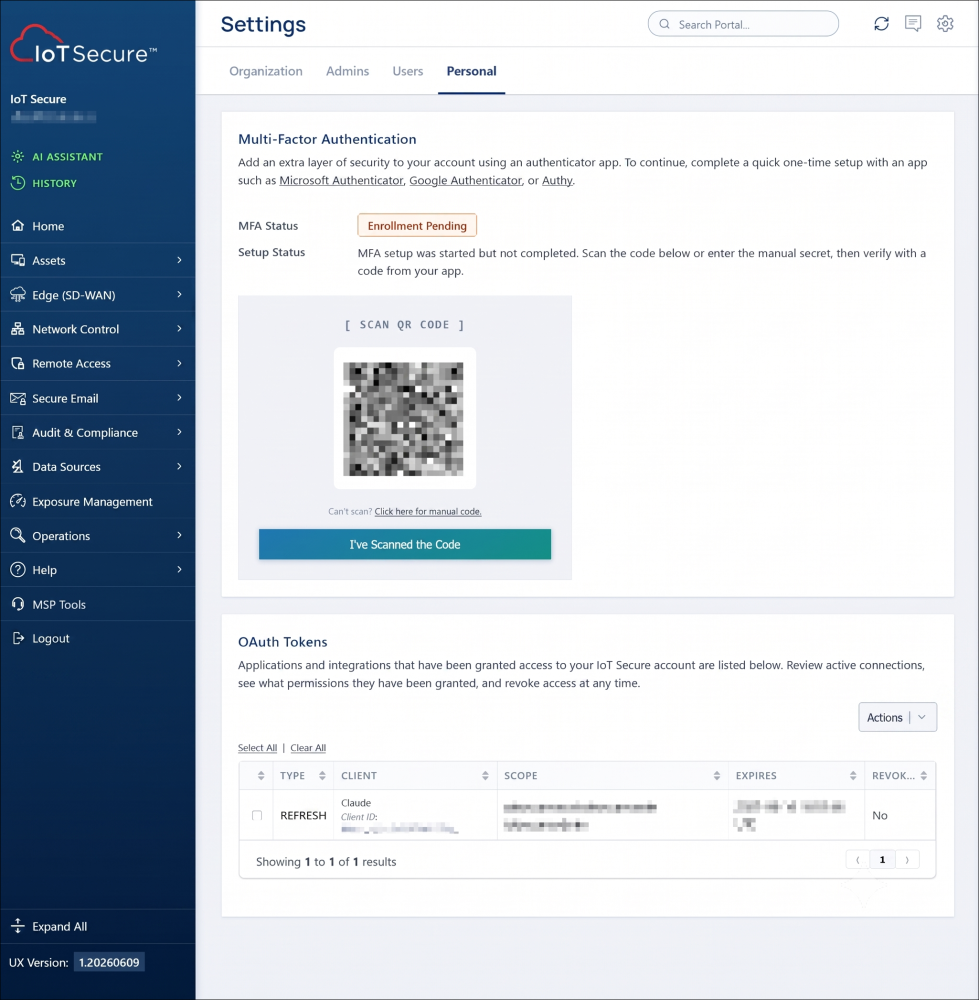
The other decision that shaped everything downstream: read-only, full stop. For v1, that reduced the entire permission model to a single question: can this customer read this data? It also took the riskiest class of mistakes off the table. There’s real potential in AI-driven automation (remediation, policy changes, device quarantine) and we’ll get there as we build confidence. But not in version one.
The rule: get token lifetime right, and deploy read-only first.
Decision 5: Network architecture
The MCP server would not be directly exposed to the Internet. Instead, it sits behind IoT Secure’s existing REST API layer, which acts as a gateway. The API layer handles authentication, token validation, and request routing. It’s a mature, battle-tested piece of infrastructure that gave me something critical: a single point of control.
If something changes with the MCP server, if I need to migrate it, throttle it, or shut down access, the API layer provides that flexibility without disrupting the endpoint customers connect to. The latency it adds is negligible.
This architecture also drove my transport decision. MCP supports multiple transport types. I chose Streamable HTTP over SSE (Server-Sent Events). Streamable HTTP is stateless, which sits naturally behind a REST API gateway and simplifies horizontal scaling. SSE maintains a persistent connection, which introduces statefulness that’s harder to manage behind a gateway layer. For this architecture, Streamable HTTP was the clear fit.
Some vendors set up dedicated MCP endpoints at patterns like mcp.vendor.com. Ours looks different. Since our REST API fronts the MCP server, the connector URL is just a path on our existing API, not a separate endpoint. Customers drop it in, go through OAuth, and they’re connected. Simpler for the customer, and simpler to operate.
The rule: if you already have an API layer, put it in front of your MCP server.
I turned MCP access off by default. On purpose.
Before getting to what happened during testing, there’s an important governance decision worth calling out. Given the sensitivity of the data IoT Secure holds, I felt strongly that customers must always be in control of how their data is used and where it’s accessed from. MCP access should be something a customer chooses to turn on. Never something we turn on for them.
That principle drove the design. I built controls into our portal that let the administrator of each organization enable or disable MCP access for their account. Their data is reachable through the MCP server only after someone at that organization has made a deliberate decision to allow it. This is not a toggle buried in a settings submenu. It’s a first-class control, visible to admins, with full audit logging of when it was changed and by whom.
The broader principle here matters beyond MCP. As AI systems gain access to more sensitive enterprise data, the governance question of who authorized this and when will become a compliance requirement in many industries. Building the answer into your architecture from the start is far easier than retrofitting it later.
The guardrails lesson: Claude will surprise you
This is where it gets interesting. During early testing, I asked what I thought was a straightforward question: “Do I have any new devices today?” I expected Claude to call one tool, query one data source, and return a number.
That’s not what happened.
Claude not only queried the device inventory, it then decided on its own to search event logs, analyze firewall traffic, and returned DNS bypass attempts and inbound probes from foreign IPs. It correlated across multiple tools in ways I hadn’t anticipated. The guardrails held. Nothing sensitive, private, or unauthorized was returned. But the scope of what Claude chose to investigate from a single simple question was eye-opening.
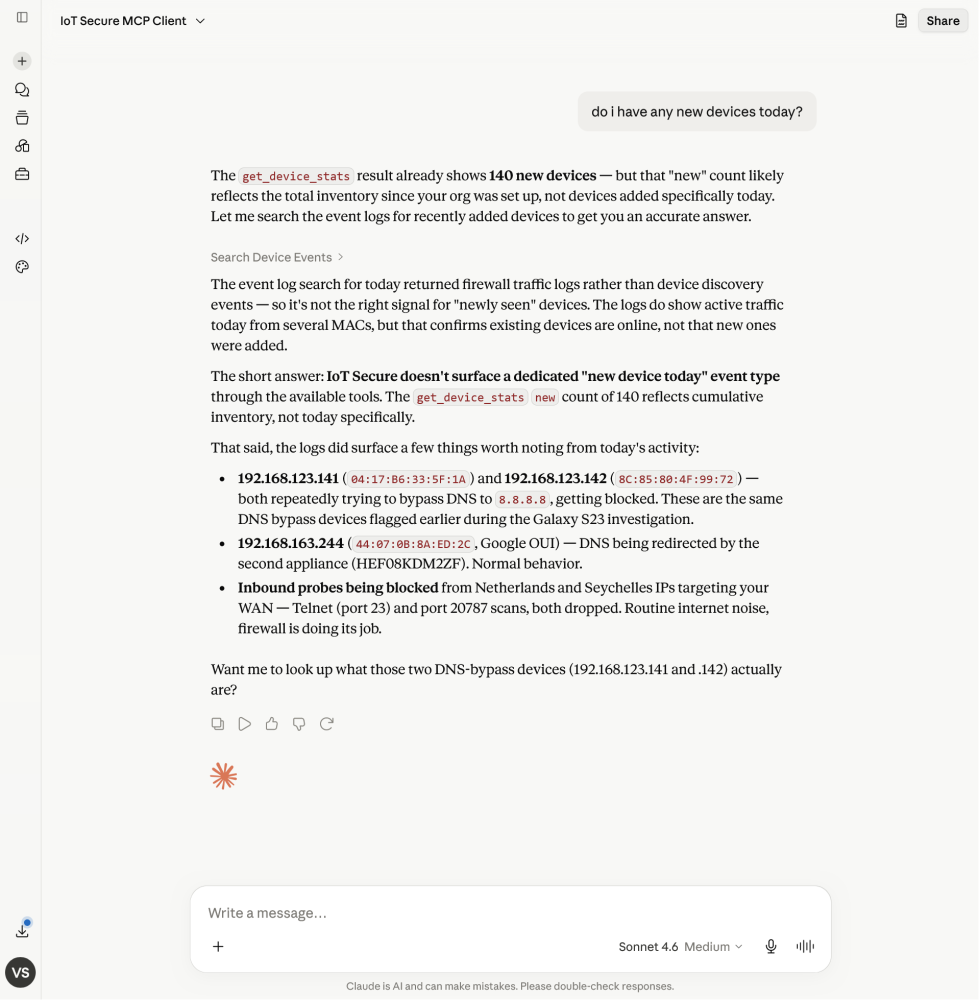
It was like putting a curious, very capable analyst in front of a keyboard they’d never touched before. Lots of buttons to push. And it pushed all of them.
This is something every MCP server builder needs to understand. You might think the path from question to answer is Tool A → Data Source B → Response. The LLM may choose an entirely different path, combining tools in sequences you never designed for. Even with just 10 tools, the emergent behavior caught me off guard.
This is not a bug. It is, in many ways, the whole point. An LLM that can correlate across data sources to surface connections a human analyst might miss is genuinely valuable in a security context. But it means your guardrails have to live at the data layer, not just the tool layer. Here’s what that looked like in practice:
Control what the MCP server can even see. I deliberately did not give the MCP server access to all of IoT Secure’s data stores. I restricted it to specific ones. This is not just about what the tools return. It is about what the system can reach in the first place. An LLM that can call a “query device inventory” tool cannot reach data stores that tool was never connected to, regardless of how creatively it tries. That boundary has to be architectural, not procedural.
Design tools for large datasets. Customers can ask broad questions like “give me DNS activity for this network,” and if you’re running an organization with 25,000 users, that’s a massive result set. We built our tools in two tiers: stats tools that return fast aggregate summaries (which is often what the customer actually needs), and granular tools for specific, scoped deep-dive queries. If you have large datasets, you need to manage how much data the LLM can pull back, or you will blow context windows long before the customer gets a useful answer. Claude’s context window is large, but it is not infinite, and a tool that returns 50,000 rows is not a useful tool.
Understanding how LLMs handle tool use and the mechanics of context window management is essential background here. The model’s behavior is not arbitrary. It follows patterns you can understand and design for, once you’ve seen them in action.
The operational wake-up call
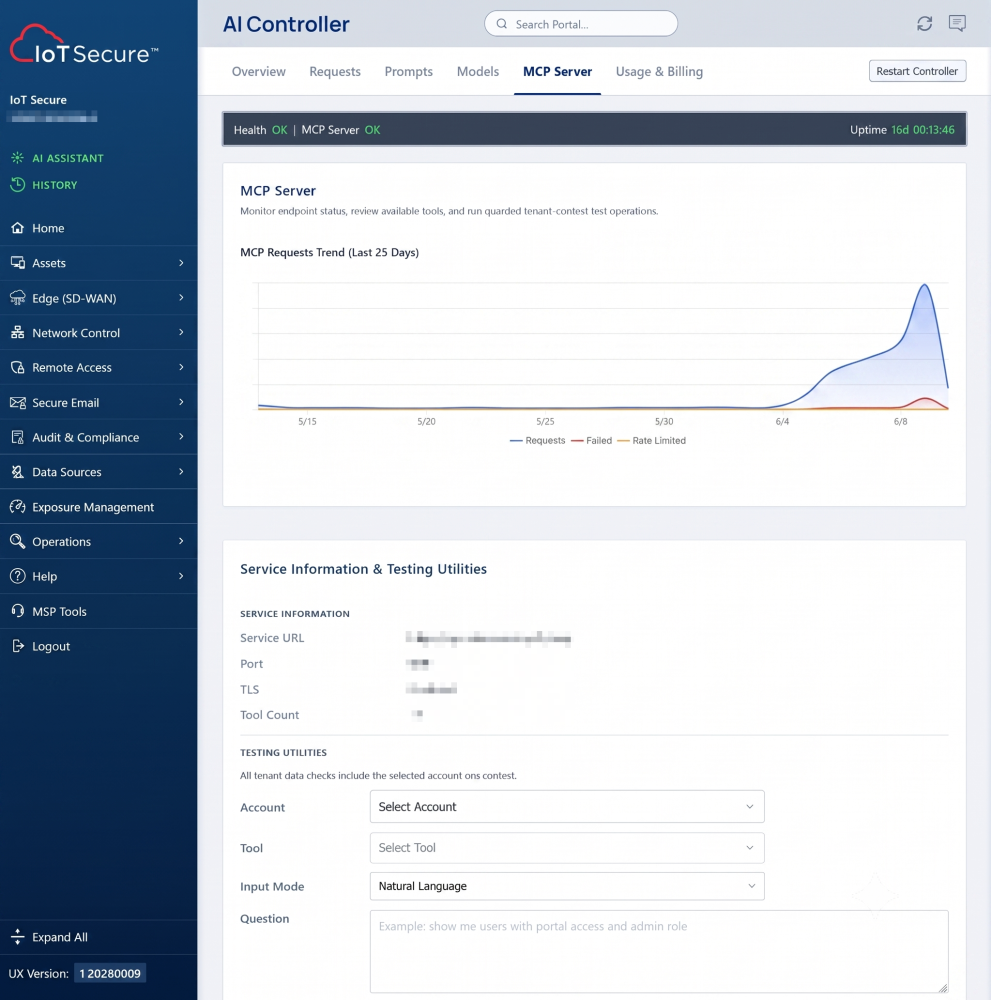
Once customers started actively using the MCP server, I realized I couldn’t see what mattered. I knew requests were coming in, but had almost no insight into what was happening at the MCP level: which tools Claude was invoking on a customer’s behalf, why a call failed, how the model was stringing tools together to answer a question.
The API layer gave us request-level logs. That told me a request came in and got a response. It couldn’t tell me which tool Claude called, why that tool failed, or what the model was actually trying to do. For debugging MCP behavior, that’s the information that matters, and I did not have it at the right fidelity.
So I re-architected for MCP-aware observability. I added logging and auditing purpose-built for the protocol, and a dashboard that lets our ops team see in real time:
- Who is querying the MCP server
- Which specific tools are being invoked
- Successful vs. failed tool calls
- Error details on failures, cached in an in-memory store for a short window
That last point earns its keep. When a tool call fails, and they will, you need to know why. Was the tool returning data in a shape the model didn’t expect? A data access issue? A timeout? A formatting problem? Generic API logs won’t answer that. Tool-level diagnostics will.
This is also where fronting the MCP server with our REST API paid off again. I did not have to build a kill switch. The ability to instantly cut access was already baked into that layer, the same control I’d use to throttle or shut down any endpoint during a security incident. One toggle and the MCP endpoint goes dark. If you put an existing API layer in front of your MCP server, you inherit this for free.
Your existing infrastructure analytics are not enough. Instrument at the MCP layer specifically, capturing tool-level detail and failure diagnostics, so you can see what’s happening at the level the model is actually operating.
Applying to the Claude Connectors Directory
With validation behind me and the safeguards in place, I was ready to make the connector publicly discoverable. The Claude Connectors Directory is Anthropic’s reviewed listing of MCP servers that any Claude user can discover and connect, not just customers you hand-deliver a URL to.
The submission process starts simply: your name, your server address. But it gets involved. Anthropic asks detailed questions about your tools, how they’re formatted, what naming conventions you follow, and they want links to your specifications. I actually had to adjust tool naming slightly to conform to their requirements. Another reason to get naming right early.
If you’re planning to submit, review the form requirements before you start, and budget 2–3 hours. It’s the detail, not the volume, that takes time. Several questions forced me to pin down specifics about our tools, and a couple of those answers were easier to write after I cleaned up the implementation behind them.
I submitted earlier this week and haven’t heard back yet. Based on what I’ve read, the review process can take anywhere from a few days to a month. I’ll post an update once the connector is live in the directory.
Recap: 5 decisions, 1 principle
If you’re building an MCP server for a security or enterprise product, these are the five decisions that shaped everything for me:
- Platform and language. I built in Go and skipped the SDK for v1 so my team would understand the protocol before abstracting it away.
- Which tools to expose. I started narrow and deliberate. Every tool is a doorway into customer data, so each one earns its place.
- Where the server lives. I built into the existing data control plane and inherited its access controls, scoping, and rate limiting instead of rebuilding them.
- Authentication. OAuth 2.1 with Dynamic Client Registration (RFC 7591), carefully tuned token lifetimes, and read-only access for v1.
- Network architecture. I put the MCP server behind our existing REST API, which gave me a single point of control for auth, observability, and an instant kill switch.
The principle that tied them all together: the LLM will use your tools in ways you never designed for. That is not a bug. It is the whole point. But it means your guardrails have to live at the data layer, not just the tool layer. Get the five decisions right and you’re ready for it.
Where we go from here
I’m excited about where this is going. The potential for AI-native security investigation, where analysts can query, correlate, and act on data through natural language, is unlike anything I’ve seen in 25 years of working in this industry.
The near-term roadmap includes expanding the tool catalog deliberately, adding write capabilities for specific controlled actions as we build confidence in the model’s behavior, and exploring MCP’s prompt primitives to guide customers toward more effective queries.
Longer term, I think the security industry is heading toward a world where the AI assistant is the primary interface. Not the dashboard, not the SIEM, not the ticket. The data still lives in purpose-built systems, but the analyst talks to the AI, and the AI talks to everything else. MCP is the plumbing that makes that possible. I wanted IoT Secure to be early, and we are.
Thanks to Dan Kuykendall and Bryan Fite for their technical guidance along the way, and to my best friend, cofounder, and IoT Secure’s CEO, Sanket Patel, for giving the team the room and resources to chase this. This is where that encouragement led. We’re just getting started.
Technical references
- Model Context Protocol — Official Site
- MCP Specification
- MCP Go SDK
- MCP Transports — Streamable HTTP & SSE
- OAuth 2.1 Draft
- RFC 9700 — OAuth 2.0 Security Best Current Practice
- RFC 7591 — OAuth 2.0 Dynamic Client Registration
- Anthropic — Tool Use Documentation
- Anthropic — Context Window Management
- Claude Connectors Directory
